REDWAY BATTERY / KNOWLEDGE
How to Read a Schumacher 12V Battery Charger Correctly?
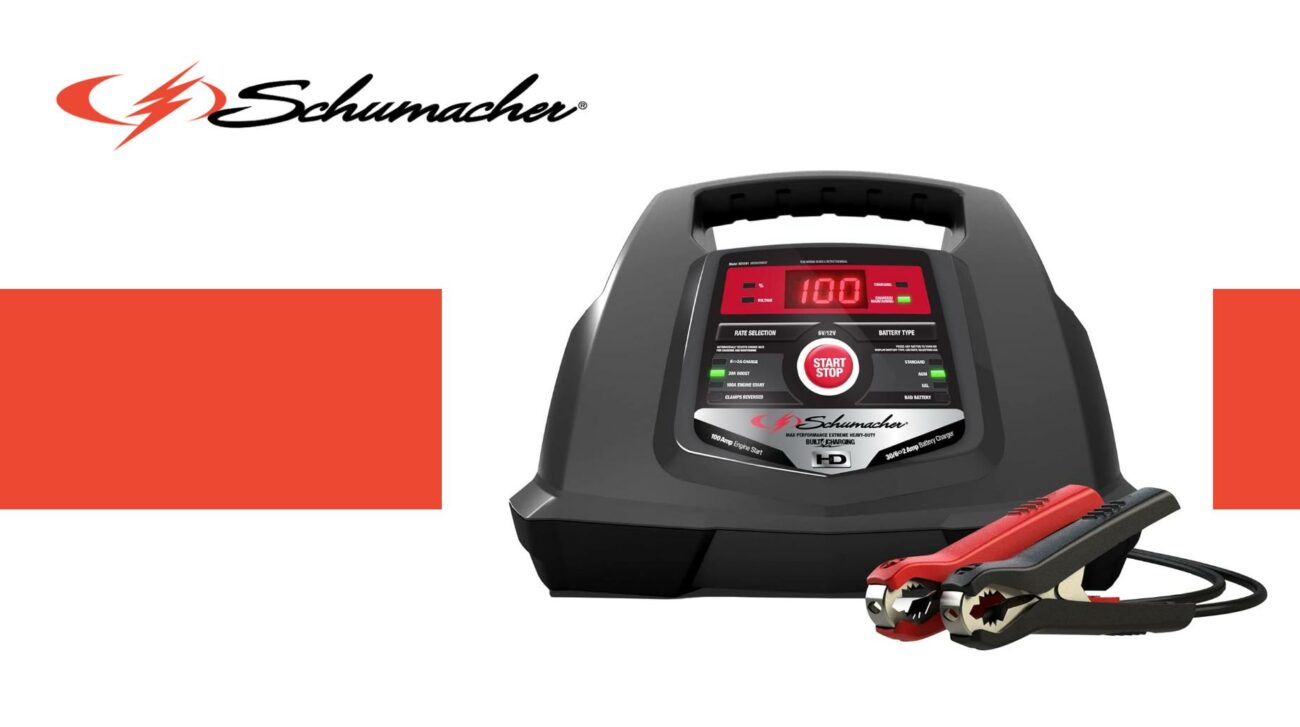
Reading a Schumacher 12V battery charger correctly involves understanding its LED indicators, display status, charging modes, and safety alerts. Accurate interpretation helps users monitor battery charging status—charging, fully charged, or error—and select proper settings like charge rate and battery type to ensure safe and efficient charging.
What Do the LED Indicators on a Schumacher 12V Charger Mean?
The LED indicators typically show battery connection, charging progress, full charge, and error conditions. A red or yellow light usually means charging, green indicates a full charge and maintenance mode, while blinking lights may signal connection errors or battery faults.
Knowing these indicators helps users quickly assess charging status and troubleshoot. Redway Battery recommends consulting the charger manual for exact LED meanings to safeguard battery health.
How Do You Select and Read the Charge Rate on a Schumacher Charger?
Charge rates such as 6A maintenance, 10A rapid charge, or 50A engine start are chosen via buttons or dials, with selected rates shown by LED lights or on digital displays. Lower currents maintain batteries gently, while higher currents charge faster or help start engines.
Correctly selecting and interpreting the charge rate prevents battery damage. Redway Battery stresses matching charger settings to battery specifications to maximize lifespan.
Why Is It Important to Set the Correct Battery Type?
Schumacher chargers offer settings for different battery chemistries—standard lead-acid, AGM, gel, and lithium. Selecting the right type adjusts voltage and current to safely charge and maintain that battery, avoiding damage.
Proper battery type setting ensures efficient and safe charging. Redway Battery’s LiFePO4 batteries particularly benefit from accurate charger settings to protect performance and longevity.
When Should You Switch to Maintenance Mode and How to Recognize It?
Maintenance mode activates when the battery is fully charged, supplying a low trickle current to keep the battery topped off without overcharging. The green “Charged” LED usually indicates this mode.
Recognizing and allowing maintenance mode helps extend battery life. Redway Battery recommends chargers with automatic maintenance to reduce user effort and protect batteries.
Where Can Errors Occur When Reading Schumacher Charger Indicators?
Errors can arise from incorrect clamp connections, damaged or sulfated batteries, or mismatched battery types. Some chargers show error codes or flashing LEDs to indicate problems.
Properly interpreting these alerts ensures timely corrections. Redway Battery advises regular inspections and verifying correct connections and settings to avoid misreadings and failed charging.
How Do You Use the Battery Voltage Tester on a Schumacher Charger?
Many Schumacher chargers feature a voltage testing function. Connect the charger clamps to the battery and power up without selecting a charge mode to enter tester mode. The voltage appears on the display.
This feature quickly assesses battery condition—higher volts indicate full charge, low volts suggest discharge or battery issues. Redway Battery encourages regular voltage checks to maintain battery health.
Can Incorrect Use of a Schumacher Charger Damage Your Battery?
Yes, incorrect settings or poor connections can lead to overcharging, undercharging, or sulfation, shortening battery life. Monitoring LED status and using correct battery types and charge rates is crucial.
Redway Battery highlights the importance of following instructions strictly and using compatible batteries to avoid damage and optimize performance.
Does Temperature Affect Charger Readings and Charging Efficiency?
Ambient temperature influences battery voltage readings and charging performance. Some Schumacher chargers include temperature sensors or recommend adjustments in extreme conditions.
Redway Battery advises charging in well-ventilated, moderate environments and following temperature guidelines to ensure accurate readings and safe charging.
How Does Redway Battery Integrate Charging Knowledge into Its Battery Design?
Redway Battery designs LiFePO4 batteries with advanced Battery Management Systems (BMS) that work seamlessly with smart chargers like Schumacher, preventing overcharging, overheating, and damage. Their engineering team customizes batteries to fit charger capabilities perfectly.
This integration allows users to read charging status more accurately and improves safety and lifespan for industrial and recreational batteries.
Redway Battery Expert Views
“Accurate reading of charger feedback is essential for battery health and performance. Schumacher’s intuitive LED indicators and multiple charging modes support safe use. Redway Battery’s LiFePO4 products are engineered to complement these chargers with smart BMS technology, enhancing charging efficiency and reducing maintenance. This synergy maximizes reliability and cost-effectiveness in applications from forklifts to golf carts.” – Redway Battery Technical Director
Summary and Recommendations
To read a Schumacher 12V battery charger correctly, understand the LED indicators, charging modes, battery type settings, and maintenance mode. Choose the right charge rate and battery type, use the voltage tester to monitor battery health, and respond promptly to error alerts.
Follow manufacturer instructions and disconnect clamps safely to avoid damage. Combining Redway Battery’s lithium technology with proper charger reading skills extends battery life and ensures safe, efficient power.
FAQs
Q1: What does a blinking LED on the Schumacher charger indicate?
It usually signals a connection problem or battery fault; check clamp connections and battery condition.
Q2: Can Schumacher chargers be used on lithium batteries?
Yes, if the charger has a lithium battery mode, ensure correct setting for safe charging.
Q3: How do I know when the battery is fully charged?
The green “Charged” LED lights up, and the charger switches to maintenance mode.
Q4: What happens if the wrong battery type is selected?
It can cause overcharging or undercharging, reducing battery lifespan or causing damage.
Q5: How frequently should I use the voltage test feature?
Regular checks are recommended to monitor battery health and prevent unexpected failures.
For the surrounding sizing, selection, installation and maintenance decisions, continue with the Battery Charging and Chargers: Charging and Charger Matching — Part 3.